Messaging Center
Every candidate conversation in one inbox — plus reusable email templates in English and Polish so your team never types the same message twice.
Open the Email Inbox
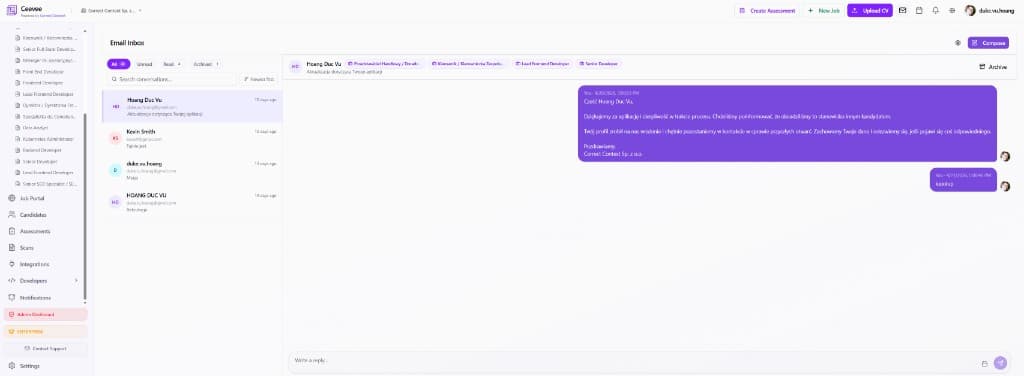
Click the envelope icon in the top bar (or Emails in the sidebar). The unified inbox lists every conversation with candidates, with filters for All, Unread, Read and Archived plus a search box.
Read and reply in threads
Click a conversation to see the full thread. Candidate tags show which jobs they’re linked to. Type your reply at the bottom and hit send — the whole exchange stays attached to the candidate’s profile.
Compose and archive
Use “Compose” to start a new conversation from scratch. Done with a thread? Click “Archive” to move it out of the active list while keeping the full history searchable.
Use Email Templates
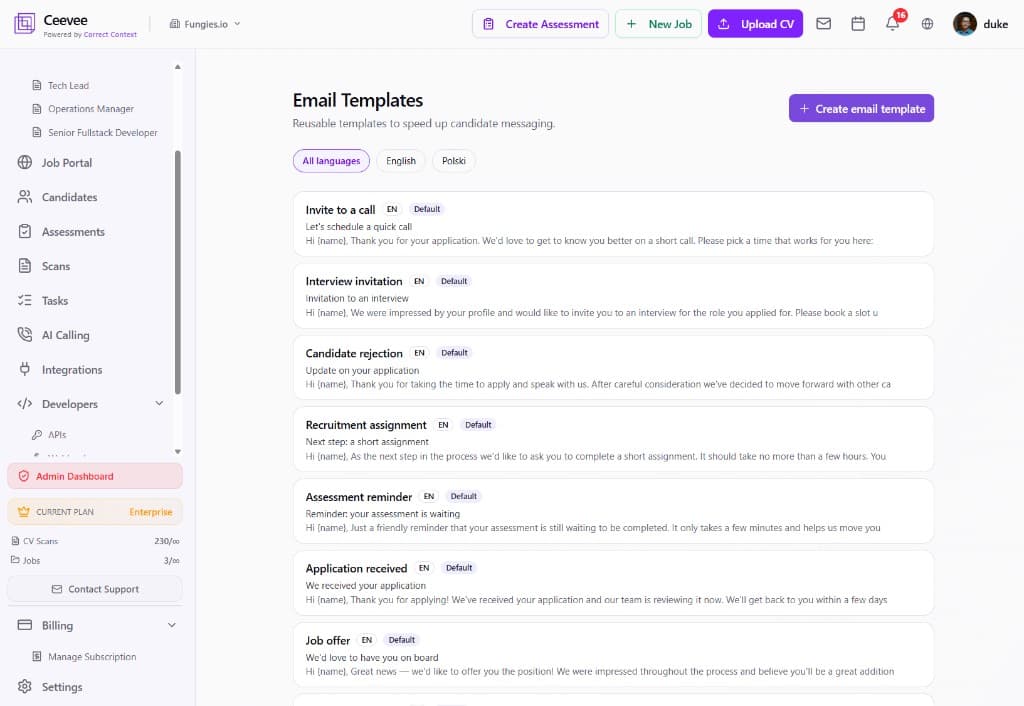
Open Email Templates from the sidebar. Ceevee ships with ready-made defaults — Invite to a call, Interview invitation, Candidate rejection, Recruitment assignment, Assessment reminder, Application received, and Job offer — each available in English and Polish.
Create your own templates
Click “+ Create email template” to add custom templates with placeholders like {name}. Filter templates by language to keep EN and PL variants organized side by side.